reg add HKCU\Software\Policies\Microsoft\Windows\WindowsCopilot /v TurnOffWindowsCopilot /t REG_DWORD /d 1 /f Create Image Linux
sudo dd if=/dev/ of=/path/to/store.img bs=4M status=progress
Terraform Providers



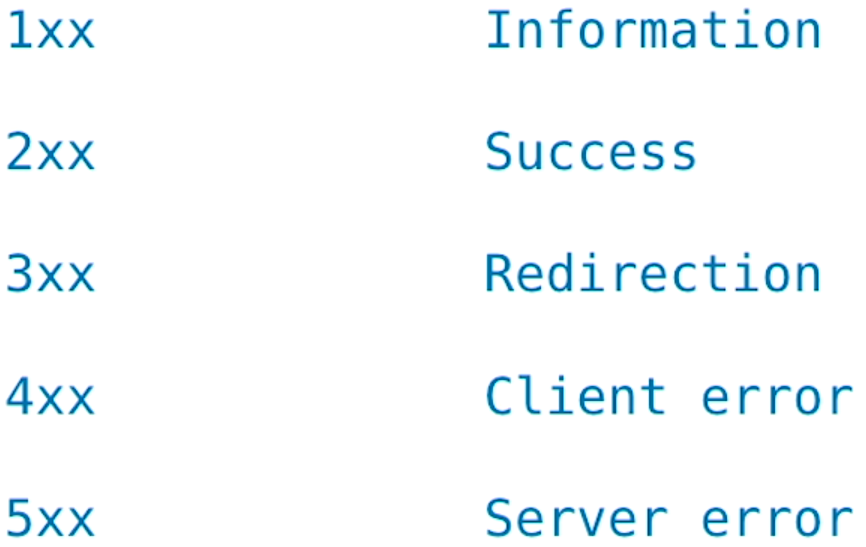
HTTP Status Codes
Mautic Cron Jobs
php /home/<user>/public_html/<dir>/app/console mautic:segments:update
php /home/<user>/public_html/<dir>/app/console mautic:campaigns:update
php /home/<user>/public_html/<dir>/app/console mautic:campaigns:trigger
-------------
Twice Per Day
php /home/<user>/public_html/<dir>/app/console mautic:messages:send
php /home/<user>/public_html/<dir>/app/console mautic:emails:send
php /home/<user>/public_html/<dir>/app/console mautic:emails:sendmautic:email:fetch
php /home/<user>/public_html/<dir>/app/console mautic:social:monitoringAdd Persistent Routes
sudo nmcli con mod <interface> +ipv4.routes “<ip address>/32 <gateway>”
DMARC
SSH
If you are experiencing slow response on graphical application, try swapping the ssh
command in Step 5 with the one below:
ssh -YC -c blowfish YourCoyoteID@cseX11.cse.csusb.edu
Top Programming Languages

WSL2 + Fedora 39 + Docker Image
Resources:
https://wslutiliti.es/wslu/
https://www.freecodecamp.org/news/how-to-install-wsl2-windows-subsystem-for-linux-2-on-windows-10/
https://dev.to/bowmanjd/install-fedora-on-windows-subsystem-for-linux-wsl-4b26
https://learn.microsoft.com/en-us/windows/wsl/
printf "\n[user]\ndefault = myusername\n" | sudo tee -a /etc/wsl.conf

wsl -t fedora
Convert Paths between shells:
wslpath -w
Linux Configuration Files:/etc
Binaries:/bin, /sbin, /usr
System and Kernel:/dev, /sys, /proc
Display version of WSL:
wsl -l -v
Set Default Version of WSL:
wsl --set-default-version 2
Pipe Windows Command Output > into > Linux Terminal
dir c: | wsl wc - l
Accessing Files:
The Windows C: drive is available in Linux at /mnt/c
Linux home directory: /home/linux-username
Windows home directory: /mnt/c/Users/Windows-Username
Distro file system in Windows: \WSL$\Distro\
Additional Commands:
“commandline”: “wsl.exe -d fedora sudo service rsyslog start”
Add startup commands to the ~/.bashrc file
crontab -e